Choose the memory before choosing the print
If the exact flowers matter—the small blue bloom tucked into the side, a ribbon from someone you love, the shape you carried down the aisle—a personal photograph is the more direct choice. You are keeping a record of your bouquet, not searching for a pattern that vaguely resembles it.
If you mainly want blush flowers or botanical detail, a ready-made design may be easier. Its composition is already arranged for a case. There is no source photograph to prepare, and you can judge the whole look from the product image. Neither option is more meaningful by default. Choose the one you will enjoy seeing on an ordinary Tuesday.
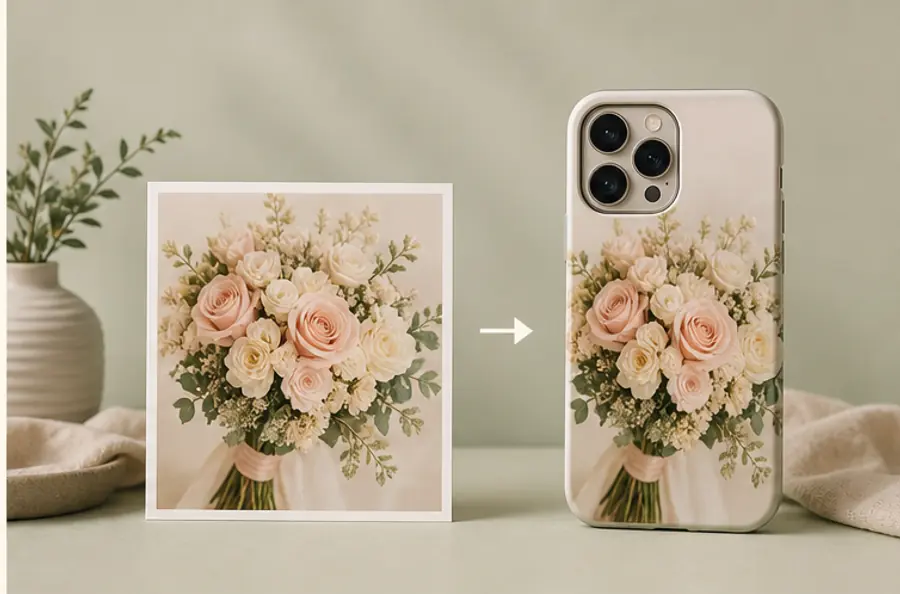
Find a frame with room around the flowers
Look through your original photographs rather than choosing the first square crop saved to social media. A frame with the bouquet in the center and space around it gives you room to move the flowers away from the camera opening. A close-up can work, but it leaves less flexibility.
Compare two candidates at small size. In one, the bouquet might be complete but far away. In the other, a few petals leave the frame while the distinctive flowers are easy to recognize. The second can be the better case image. Count the details you would miss, not the number of petals you can fit.
Use an image you own or have permission to reproduce. If a wedding photographer made it, check your agreement or ask about a personal printed item. Request the original download when available; a screenshot of an online gallery may include extra compression or interface details.
Keep the ribbon if it helps tell the story
A long ribbon can draw the eye down a tall case, but it may also make the bouquet smaller than you want. Try one composition with it and one without. If the ribbon is the sentimental detail, tell the studio to preserve it. If the flowers carry the memory, give them more space.
The same applies to hands, a dress or a table behind the bouquet. They can establish the occasion or compete with the flowers. You do not need to remove every sign of the setting. A little surrounding color can make the image feel like your actual day rather than a catalog arrangement.
A floral design when you want the feeling
The Blush Lily and Polka Dot design is a ready-made alternative in the current Mood In Case catalog. Its pale floral detail and patterned background offer a romantic palette without using a personal wedding image. Open the product page to check the live price and available models; this ready-made product is separate from the $35 custom service.
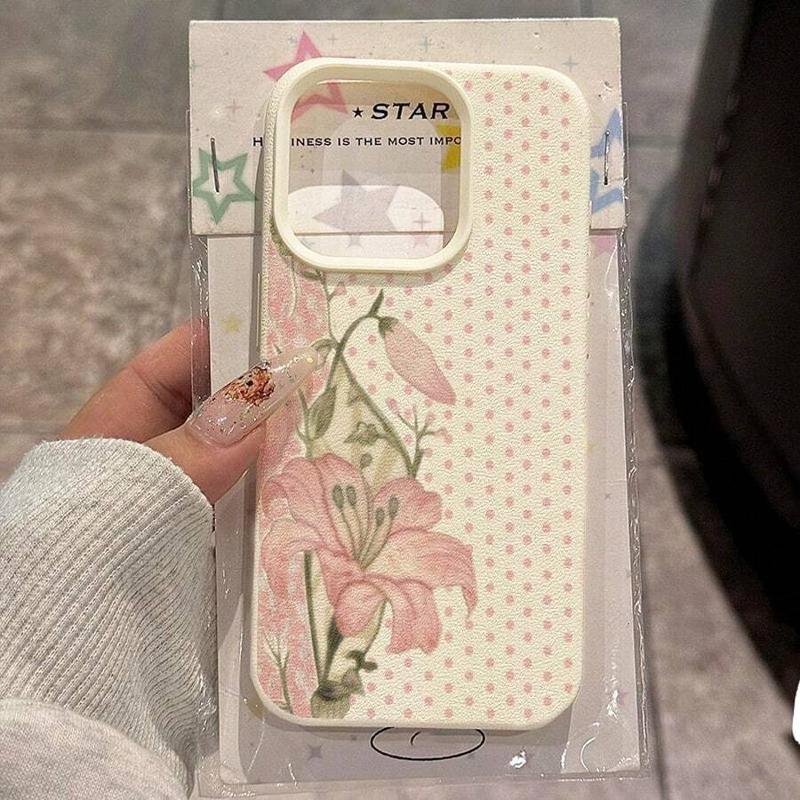
Blush Lily & Polka Dot
A ready-made floral option for the mood of flowers, without preparing a personal photograph.
View product details →Arrange the photo for your phone, not a square frame
In DIY Studio, choose the available case and exact phone model before settling on a crop. Start with Fit if you want the complete bouquet visible. Try Fill for an edge-to-edge field of flowers; it may crop the outer petals. Look especially at a distinctive bloom near the camera opening.
Smart Arrange provides a starting layout. Manual Adjust lets you drag, zoom and rotate; Studio Arrange is useful when you want another eye on the composition. A note such as “keep the blue flower and the ribbon knot” gives the team something concrete to preserve. The preview guides placement, not an exact match between screen and printed colors.
Make the order easy to finish
The custom photo service is $35. Upload one PNG, JPG or WebP up to 12 MB; at least 1500 pixels on the shortest side is recommended, not required to pay. For several photographs, prepare one combined image first. A simple bouquet does not need to become a busy collage unless each extra image adds something you want to keep.
Standard shipping to eligible U.S. addresses is free and applicable sales tax is included. Check processing and shipping information for an occasion-specific order and read the custom-order return conditions. After checkout, Track order provides email-verified access without creating an account. Contact our studio if the photo needs discussion. A clear instruction can matter more than another round of cropping.
A few practical questions
Can I put my wedding bouquet photo on a phone case?
Yes. Upload one PNG, JPG or WebP, up to 12 MB, through Mood In Case's $35 custom photo case service. Choose an available case and exact phone model, then arrange the photo or ask the studio for help.
Does the whole bouquet have to fit?
No. A close crop can work when color and petals are what you want to keep. Choose Fit and leave more space if the ribbon, stems or complete bouquet shape matters to you.
Can I use a professional wedding photograph?
Check the permission or license from your photographer before uploading. Having a copy does not necessarily mean every reproduction use is included.