MOOD IN CASE / CUSTOMER CARE OR CHECKOUT
Does Clicking WhatsApp Place a Phone Case Order?
Published November 5, 2026 · Mood In Case editorial
No. Mood In Case's website WhatsApp button opens a customer-care link; it does not select a case option, add an item to your bag, submit checkout or confirm payment. Use it to clarify a purchase question, then review the product and website checkout when you are ready to buy. If you already ordered, ask about that existing order instead of treating a new conversation as a reason to pay again.
See two exact catalog options →Start with the detail you need to resolve
You might like a floral print but be unsure about the option name, or want to check a detail before choosing a gift. The WhatsApp entry gives you a route to customer care while you consider the purchase. Its role is different from the product selector and checkout. Decide what you need to ask first, so opening a conversation helps you make a decision rather than leaving you unsure whether you have bought anything.
Keep the product link, selected phone model and color label together. A screenshot can help describe the artwork, but it may omit the exact selected option. Include the option link when you have one. If the question is about a feature, material or accessory pairing that the page does not verify, ask for clarification instead of assuming that a similar-looking photograph settles it. The link below each example retains its exact catalog option.
Two case options you can identify clearly
The Blush Pink Floral Lily Polka Dot Fabric Texture design below is selected as iPhone 17 Pro Max, White, at an observed product price of $9.90 USD. Its representative catalog photograph shows pink lily artwork and small dots on a light background. Use the exact link to ask about that option. The design's catalog name and picture do not, by themselves, establish a particular fabric composition, texture you can feel or physical fit for every offered phone.
The Vintage Payphone Graphic example is selected as iPhone 17 Pro Max, Black, also observed at $9.90 USD. It is a ready-made artwork choice with a different visual character. Mentioning this design in a conversation does not place it in your website bag or change the floral option you previously selected. Open the product link and check the current model, color and price before taking the next purchase step. These photographs are catalog illustrations of the choices, not screenshots of a customer order.
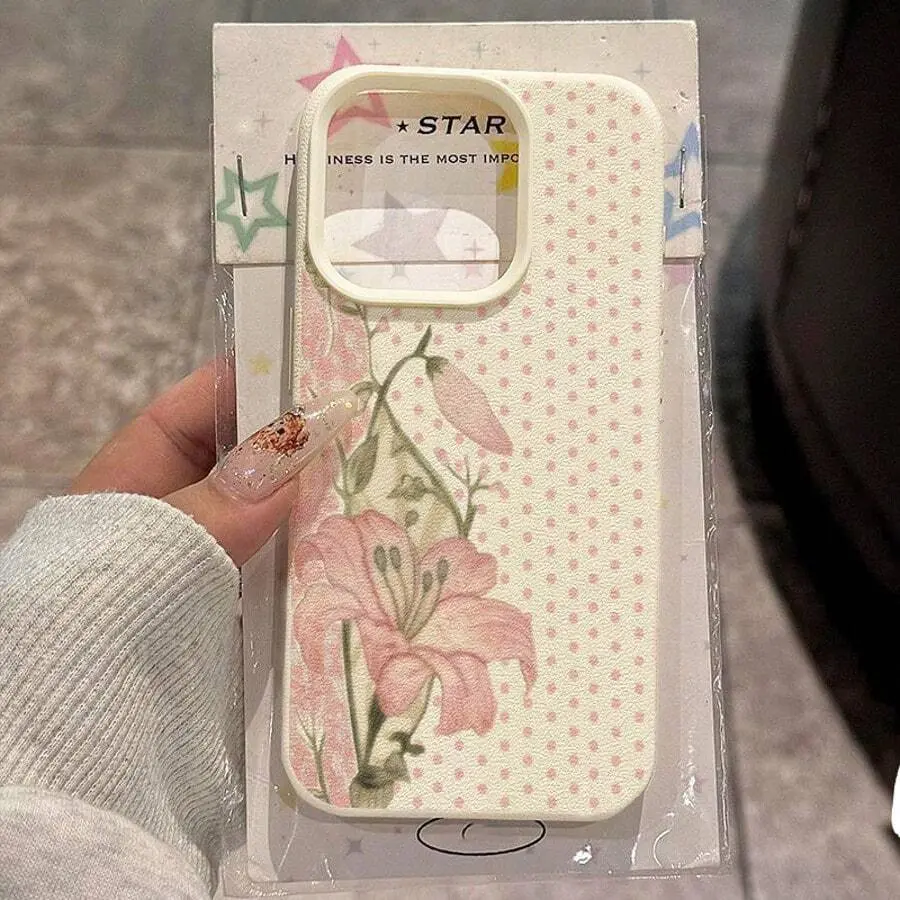
Unchanged representative catalog photograph, not a website order receipt or an all-model physical-fit test.
Review Blush Pink Floral Lily Polka Dot Fabric Texture exact option →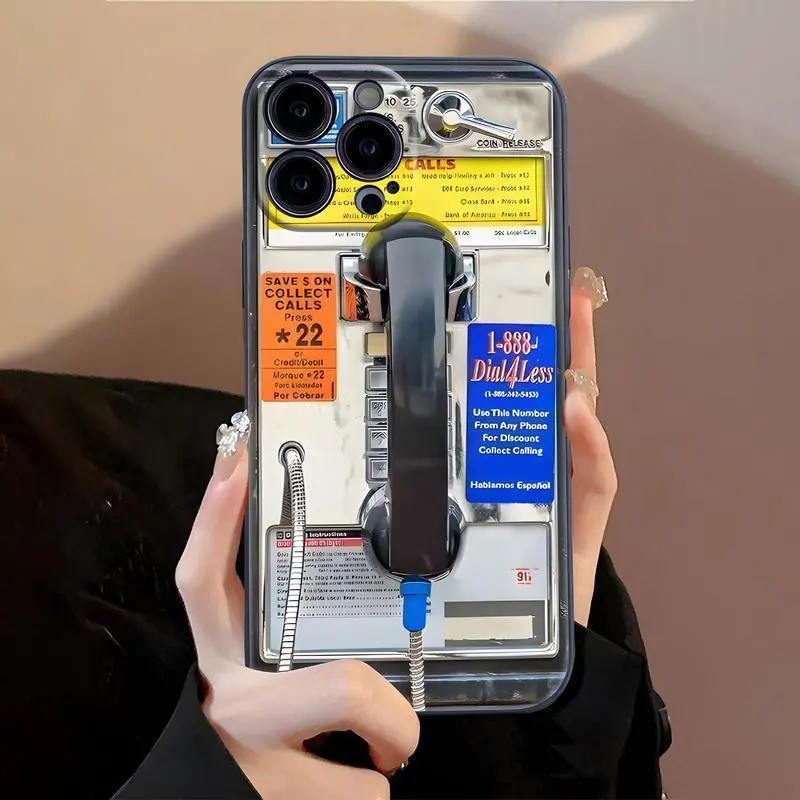
Unchanged representative catalog photograph, not a website order receipt or an all-model physical-fit test.
Review Vintage Payphone Graphic exact option →Opening the chat is not sending or checking out
The website's approved WhatsApp destination is +1 302 409 5296. Its link may include a short greeting identifying Mood In Case and the page you were viewing. That greeting is conversation context, not an order form. If your device displays a draft, review it and decide whether to send it yourself. The website link does not contain a chosen case SKU, shipping address, card details or proof of payment.
An app opening, a draft appearing and a reply arriving are communication steps. None should be mistaken for a website payment confirmation. This guide does not promise a response time or describe an automatic ordering service inside WhatsApp. You can also use the support email shown on the contact page if that suits the question better. Choose a channel you can return to and keep the relevant answer for your own reference.
Use the answer to review your selection
If support points you toward another design or model option, return to the product page and make that selection yourself. Check the phone's full model name rather than relying on a family name, and read the selected color label even when the representative photograph looks familiar. A helpful conversation can clarify the choice; it does not silently update your website selection or turn a different product link into the item you had open earlier.
For an artwork change, explain whether you mean a question about an existing design or a separate custom project. Do not assume that discussing a change edits a ready-made product. Review the current custom-service information if that is the route you need, and confirm the actual scope before proceeding. Keep any unresolved point explicit. A message asking whether something is possible is different from receiving a clear answer about what will be supplied.
Return to the website when you are ready to buy
After the question is resolved, review the exact item in the website purchase flow. Check the product, phone model, color, quantity and displayed total before proceeding with the available payment method. If opening the conversation took you to another app or device, check the current website bag again rather than assuming a selection moved with the conversation. The purchase summary is where you verify what you are actually preparing to order.
Enter payment details only in the appropriate checkout interface, not in a customer-care message. A support conversation should not require your full card number or card security code. Keep any order reference and payment confirmation available for later checks. If the checkout result is unclear, establish the status of that same attempt before trying again; opening a fresh chat or repeating a product request does not establish whether an earlier payment completed.
If you already ordered, keep the existing order separate
For an existing website purchase, say that you are asking about an order already placed. Provide the relevant order reference privately if you have it, and describe the issue without posting customer details publicly. That helps separate a pre-purchase product question from an update about an existing transaction. A case picture alone may identify a design while leaving the actual order unknown, especially when more than one customer can buy the same artwork.
Finally, distinguish a requested change from a confirmed change, and a tracking update from a payment result. Wait for information about the specific existing order rather than creating another checkout to express the same request. The useful outcome is a clear answer and a purchase record you understand. The WhatsApp button provides a contact route; your product selection, website order status and payment confirmation remain separate things to check.
Quick answers
Does opening the WhatsApp button add the displayed case to my bag?
No. The button opens a customer-care link with conversation context. It does not select a SKU, change the website bag or submit checkout.
What should I include in a pre-purchase question?
Include the product-option link, full phone model, selected color and the specific detail you need to resolve. A representative photograph alone may not identify your selection.
Should I order again if I am unsure about an earlier payment?
Check the status of the same existing attempt first. A new conversation is not payment confirmation, and repeating checkout can create a separate transaction.
Ask clearly. Review the website order separately.
Use the current customer-care link for a question, then check the selected item and checkout separately.
Contact Mood In Case Customer Care →Shipping and returns · Read the current custom-service information · More buying guides
Sources checked November 5, 2026: the current Mood In Case catalog, product selectors, contact and shipping/return pages. No order, payment or message was created for this guide.