CHECKOUT HELP · CARD PAYMENTS
Do You Need a Link Account to Pay by Card?
No. Mood In Case offers guest checkout and card payment through Stripe. Link is an optional wallet for saved payment details. A Link sign-in screen does not mean you need to create a Mood In Case account to buy your case.
You have picked a design and checked the phone model. Then a payment screen asks you to verify yourself, and buying a case suddenly feels like opening another account. The useful distinction is between entering a card for this purchase, choosing saved details in Link, and completing a check requested by your bank. They are different steps.
Choose your case and exact phone model →What is Link, and why might it appear?
Stripe describes Link as its digital wallet for reusing payment methods. If you choose that wallet, signing in lets it retrieve your saved details. This is separate from your purchase on our store.
Link’s purchase instructions explain that returning users verify their identity with a one-time code before saved information is filled in. If you prefer to enter your card for this purchase, use the ordinary card option offered by the checkout instead. Payment-page layouts can vary; look at the choices on your own screen.
How to continue with a card
- Check the product, full phone-model name, selected color and quantity in your bag.
- Continue to checkout and complete the delivery details requested for your order. Use an email address you can access for the confirmation.
- Choose Pay by card · Stripe when the payment choices appear. You will continue to Stripe’s secure checkout.
- If a Link sign-in panel opens and you do not want to use it, look for Pay without Link or the available control for returning to the payment-method choices. Choose the card form shown there. The wording and placement may differ.
- Review the currency and final amount before submitting payment, then follow any verification requested by your card issuer.
If you cannot find a card option, do not keep starting new orders. Return to the existing checkout or contact customer care with the wording you see. Never send your complete card number, security code or a one-time verification code to our support email. Payment details belong in the payment provider’s secure form.
Keep the selected case clear while you check out
These two current catalog examples show why it helps to read the order summary even when payment is straightforward. One has a small curled orange cat on a light background; the other has pink lilies, dots and a fabric-texture appearance. Choose the design you want, then check the exact option independently of the photograph.

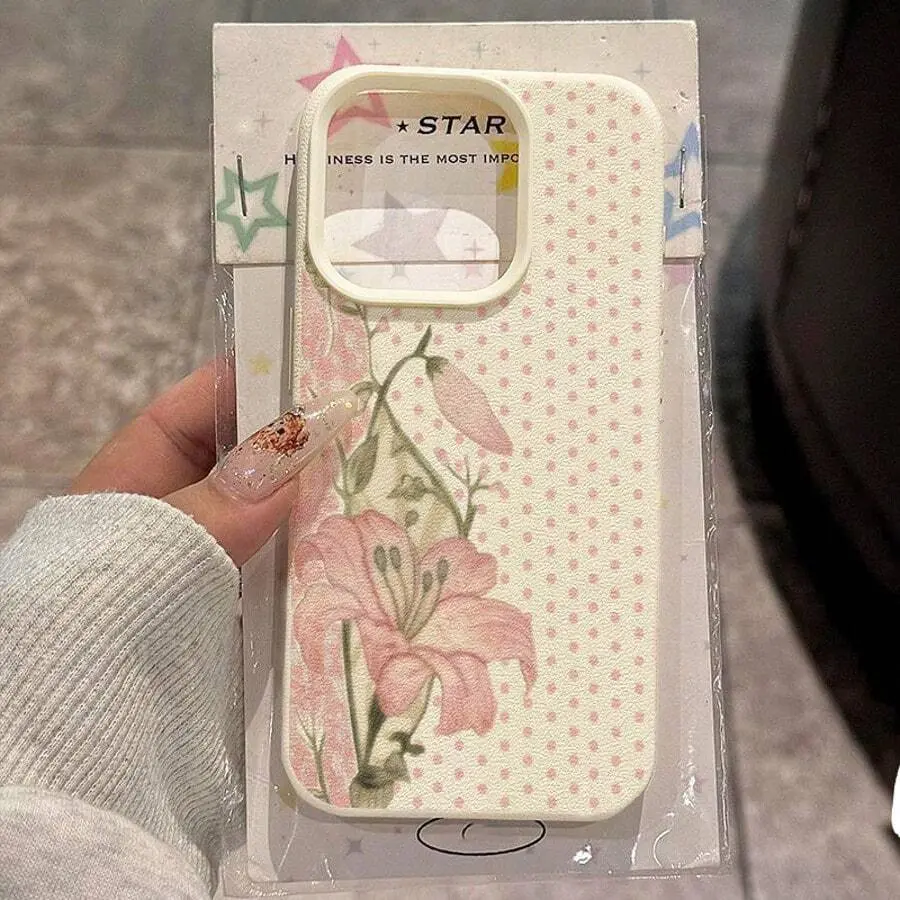
Each linked White / iPhone 17 Pro Max selection was listed at $9.90 USD when checked on October 22, 2026. These are specific options, not a price or fit promise for every variant. The photographs are existing product-listing images and may show a representative phone. Review current availability, your selected model and the final checkout total.
A payment wallet cannot correct a wrong phone selection. If you change from Pro Max to Pro, or select a different generation, read the updated model and price before continuing. For a gift, confirm the recipient’s full phone-model name first. Similar camera layouts in a photograph do not establish interchangeable fit.
Does guest checkout remove every verification step?
Guest checkout means that you do not need a store account. Your payment provider or bank may still ask you to verify a card payment. Complete that request only through the secure payment or bank flow presented to you. A verification request is not, on its own, evidence that a purchase has been charged or that a Link account is mandatory.
If an error appears, read the message before changing methods. Check that the information you entered is accurate and that the displayed total is the one you intended to pay. If the bank declines the payment, contact the bank or use another available method after checking the original payment status. We cannot guarantee acceptance of every card.
Address saved, payment pending or order confirmed?
Filling in an address does not finish payment. Returning from Stripe also does not automatically mean an order is paid. Read the confirmation state on the page: if payment is not completed, use Check payment status and, when offered, Resume secure checkout to continue the same checkout.
If the page says payment was received but order confirmation is pending, retry the confirmation rather than paying again. Keep the checkout reference and contact customer care if the status remains unclear. A delay or browser interruption is a reason to check the existing attempt before creating another one.
Once payment and order confirmation are complete, keep your order number and confirmation email. Before purchasing, you can also review our shipping information and returns information. If you are still choosing a design, the product link below opens the exact catalog option so you can review it before proceeding.
Review the tabby case and model →