A FAMILIAR PLACE TO CARRY
A Home Photo Phone Case for Your Next Chapter
Photo DIY · $35 per case
Create your home photo case →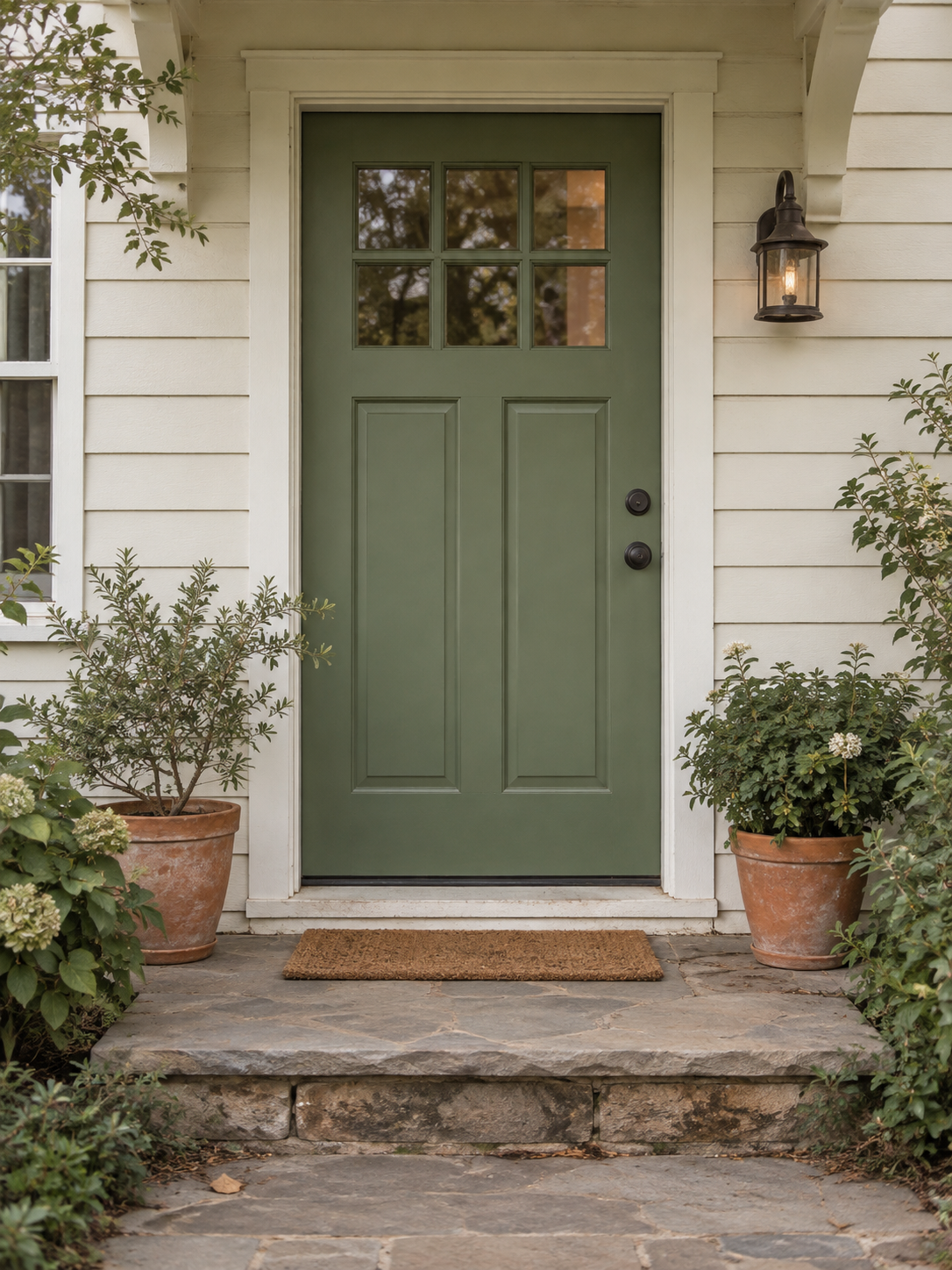
A front door can mean more than a picture of a house. It can bring back the sound of someone arriving, a familiar step, or the place you returned to after a long day. If you are moving away, starting college, or making a gift for someone who misses home, your own photo of that entrance can become the artwork for a custom phone case. Mood In Case photo DIY is currently $35 per phone case. Choose the exact phone model, upload your picture, and review the placement before adding the design to your bag.
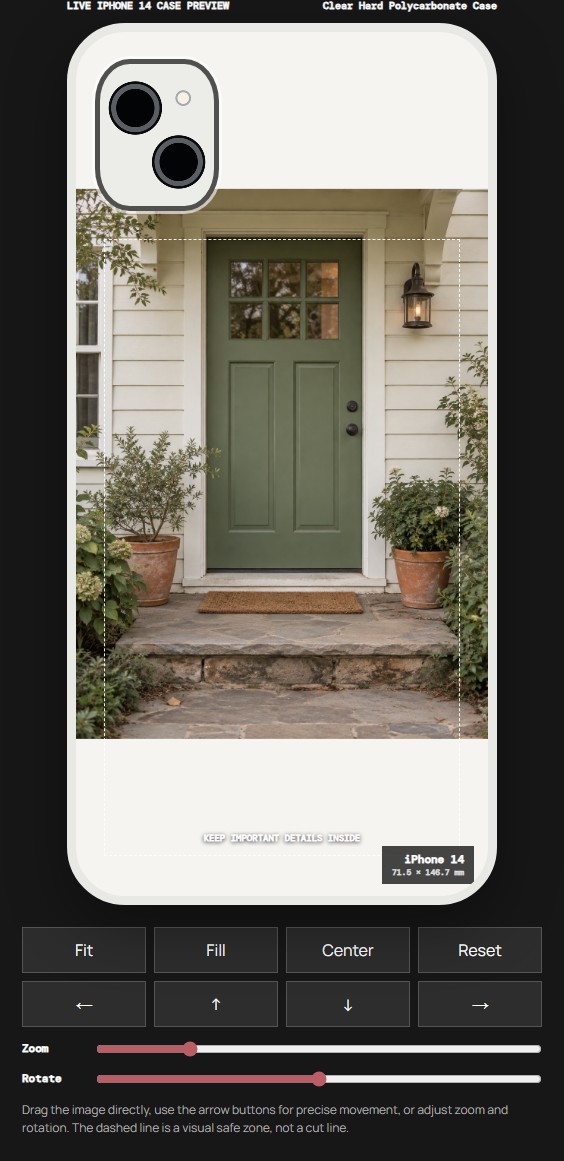
Start with your home photo. You can try the placement in the editor before deciding to order. The example above pairs an AI-created doorway photograph with a screenshot from the actual Mood In Case editor. It shows what the controls do; it is not a customer photograph or a finished printed case.
Choose the part that feels familiar
Think about what makes the place recognizable to you. Perhaps it is the green door, the two plants on the step, or a porch light you remember seeing every evening. Those details make a more personal starting point than trying to include the entire building. A house does not need to look perfect to make a meaningful picture. A worn threshold can be the detail you care about most.
Look through photos you already have before taking a new one. A picture from the season you remember may say more than a newer, tidier view. If you are making a gift, choose a place that matters to the recipient, rather than assuming your favorite photograph is also theirs. A casual conversation about the photo can help you check this without promising a particular finished result.
A close view can keep the address out of the design
Your case is something other people may see in a cafe, at work, or on public transport. Check the source photo for a street number, a readable address label, a car plate, or a name on the door. If you do not want those details on the case, choose another view or prepare a separate edited copy before uploading. Keep the original file so that you can return to it.
In our example, the doorway is recognizable through its shape, color, light, and plants. There is no address in the image. You can use the same idea with your own picture: decide which details carry the memory and which details do not need to travel with you. This is a design choice you can make before opening the studio, without learning any of the editor controls first.
What the example actually shows
The original is a portrait photograph. We selected iPhone 14 and Clear Hard Polycarbonate Case, uploaded that file, and used Manual Adjust → Fit. The editor preview keeps the door, plants, and step together. You can see open space above and below the photograph because the image and the tall case area have different proportions.
That space is part of the placement decision. It does not prove that the unprinted area of a clear case will be opaque white. The editor background, camera outline, and dashed guide help you position the design; they are not extra artwork that you should add to your photograph. If the appearance of the clear area matters to your plan, ask the studio before ordering.
Try your own picture in a few deliberate steps
Open the photo DIY studio and select the recipient's exact phone model. Similar model names can mean different camera openings, so use the complete model name rather than choosing by screen size or the phone's color. The example uses iPhone 14 only to demonstrate placement. Select the model you actually need when you create your design.
Choose a case option, upload the image, and open Manual Adjust if you want to place it yourself. Start with Fit to see the whole photograph. You can then compare Fill if you prefer the photo to cover more of the case area. A closer crop may remove the plants or the top of the doorway, so check the result against the detail that made you choose the picture in the first place. Use the original image as your reference, not just your memory of it.
You do not need to fill every part of the preview to make a personal design. Stop when the important features feel clear and comfortably placed. If you would rather have help with the layout, the studio also offers Studio Arrange. Use that route to describe what matters in the photo and confirm any production questions with the team.
Choose a material for the result you want
The live studio includes Clear Hard Polycarbonate Case and Clear Flexible TPU Case among its options. Those are separate material choices, not a promise that they have the same finish or feel. Read the current option description and check the model selector for the combination you need. Do not infer a drop rating, magnetic charging feature, or a particular print finish from this example.
For a photo with a lot of open space around it, the appearance of the unprinted area may be especially important. Tell the team which material and phone model you are considering if you need guidance. If you want a material beyond the listed choices, use the studio's WhatsApp contact. Availability and any different requirements should be confirmed for your design.
Make the gift easy to receive
Before placing an order, check the selected model, material, preview, quantity, and delivery details. The current phone photo DIY price is $35 for one case. The example on this page is one design for one phone; it does not include a second case or a gift set. Review the actual checkout total and the current returns policy before paying.
A short note can explain why you chose this particular photo without putting a long message into the artwork. The case can carry the image; the note can carry the story. If the gift is tied to a move or a birthday, ask about the current production and delivery estimate before relying on a specific arrival date.
The best next step is small: find the photograph that feels like home, confirm the phone model, and see it in the editor. Create your home photo case and keep the familiar detail at the center of the design.
Before you start
Do I need a photograph of the whole house?
No. A doorway, porch, or other recognizable detail can be a personal starting point. Choose the part that matters to you and check it in the editor.
Can I keep a house number out of the artwork?
Choose a view without the number or prepare a separate edited copy before uploading. Keep the original file so you can return to it.
Does Fit create a white printed border on a clear case?
The preview shows placement, not a guarantee of an opaque white border. Confirm the appearance of unprinted areas with the studio if it matters to your design.
Is this a real customer's home or a printed product photo?
No. The source scene is AI-created and the case view is a screenshot from the actual editor. Your design uses the photo you choose.